
The Enclosed Server Rack Buyer’s Guide: Sizing, Cooling, and Environmental Protection
An enclosed server rack is a four-sided cabinet — solid side panels, lockable front and rear doors — that houses 19-inch rackmount equipment in a single sealed body. Compared with an open-frame rack, it adds physical security, dust protection, acoustic damping, and managed front-to-back airflow. Compared with a small wall-mount network cabinet, it scales to full-depth servers and much higher static load capacity.
This buyer’s guide covers what an enclosed server rack actually is, how to size and specify one, the cooling math you need to avoid the most common failure mode, IP-rating decisions for outdoor and industrial deployments, and how to read the specs of the major brands.
Quick Specs: Enclosed Server Rack
| Standard mounting width | 19″ / 482.6 mm front panel; 17.75″ / 450.85 mm usable equipment width (EIA-310-D) |
| Common heights | 6U, 9U, 12U, 15U, 24U, 42U, 48U (1U = 1.75″ / 44.45 mm vertical pitch) |
| Depth range | 600-1200 mm; full-depth servers typically need 1000-1200 mm |
| IP rating range | IP20 (controlled indoor) → IP65 (dust-tight, sealed outdoor) |
| Mounting hardware | M6 cage nut + 10-32 thread (also 12-24 in legacy gear) |
| Static load capacity | 500-1500 kg typical; ~50-100 kg per U practical limit |
What Is an Enclosed Server Rack? (and How It Compares to Open Frame)
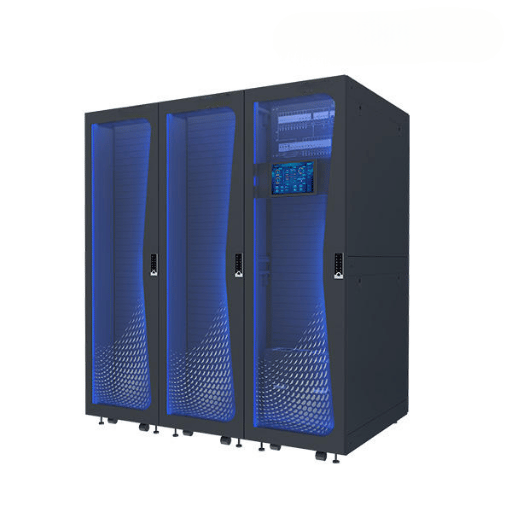
An enclosed server rack (also known as an enclosed server cabinet) is a metal cabinet built around four EIA-310-D mounting rails, with solid side panels and perforated or solid front and rear doors. Its body locks; cable entries are gasketed or brushed. An enclosed rack does four things an open-frame rack cannot: physically isolate equipment from people and accidents, force airflow into a defined front-to-back path, dampen the noise of built-in fans and disk drives, and provide a specified IEC 60529 IP rating against dust and water.
Compare the traditional open-frame rack to the enclosed cabinet and the contrast is sharper than most buying guides admit. Open frames cost less, are lighter, easier to service from any side, and all of that ambient airflow seems to help in a temperature-controlled data hall. That “seems to” is the operative point.
Once the open rack lands in a dusty industrial room, a back-office closet against a wall, or anywhere recirculating hot exhaust can find its way to the front intake, the open-frame airflow advantage erodes within months. Industry practitioners commonly report that dust ingested by filter-less servers shortens equipment life and creates localized hot spots — both avoidable with a properly perforated enclosed cabinet.
“Enclosed cabinets are always more expensive than open frames” — true at the entry level (a 5U open-frame mount starts around $270; a 16U enclosed office cabinet starts around $1,400). But at full-depth 42U and above, enclosed and open-frame 4-post racks converge in price because the steel mass and the rails dominate the bill of materials. That 4× price gap people quote applies only to the lightweight wall-mount segment, not to data-center-class cabinets.
Three-bucket decision tree: enclosed vs open frame vs network cabinet
- In a secure room with controlled dust and <10 kW per rack → 4-post open frame. Maximum airflow, easiest serviceability, lowest cost per U.
- For offices, branches, dusty plants, or any room shared with people → enclosed server rack with perforated doors. Security, dust control, and acoustic isolation without giving up front-to-back cooling.
- For a SOHO or IDF closet with ≤9U of switches and a small NAS → wall-mount network cabinet. Footprint matters more than load capacity.
Server Rack Sizes Explained: U-Height, Width, Depth (with the 30% Headroom Rule)
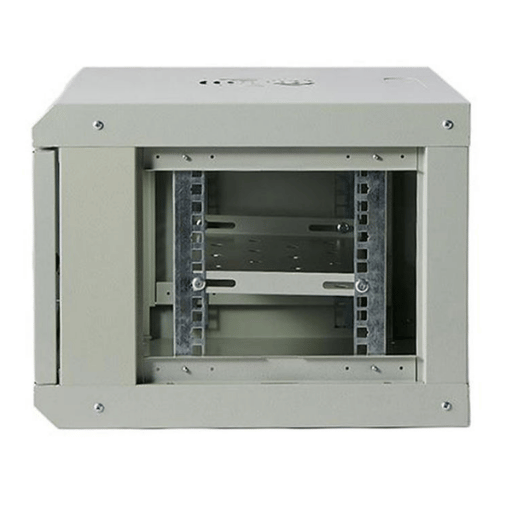
Every 19-inch rack is defined by three numbers: vertical capacity (U), mounting width, and usable depth. EIA-310-D fixes the first two; depth is the variable that wrecks budgets when buyers under-specify it.
1U equals 1.75″ or 44.45 mm of vertical mounting space, divided into three holes per U. Mounting flanges sit 19″ (482.6 mm) apart at the front panel, with 17.75″ (450.85 mm) of usable equipment width between them. These dimensions have not changed in 60 years — every rackmount switch, server, and PDU on the market is built to them. (For a deeper standards walk-through, see our reference pages on 19-inch rack standards (EIA-310) and cabinet U space from 6U to 48U.)
How much depth does my server rack actually need?
Depth is the dimension that returns more racks than any other. Server chassis depth varies from 14″ for short-depth networking gear up to 36″ for a fully-loaded GPU compute node. Power distribution units, rear cable arms, and articulating cable management add another 4-8″ behind the rear rail. Average cabinet depth in the US market is about 36″, but full-depth servers increasingly need 1000-1200 mm (39-47″) of internal depth to close the rear door cleanly.
| U Height | External H | Typical depth | Static load | Use case |
|---|---|---|---|---|
| 6U / 9U | ~370-490 mm | 450-600 mm | ~30-50 kg | Wall-mount switch closet |
| 12U / 15U | ~620-770 mm | 600-800 mm | ~60-100 kg | Branch office, retail back room |
| 24U | ~1200 mm | 800-1000 mm | ~400-600 kg | Server room, MDF |
| 42U | ~2000 mm | 1000-1200 mm | ~800-1200 kg | Data center workhorse |
| 48U | ~2260 mm | 1100-1200 mm | ~1000-1500 kg | High-density colocation |
📐 Engineering Note: the 30% U-Headroom RuleSpecify a rack with at least 30% more U capacity than your day-one load requires. A 24U installation slotted into a 24U cabinet leaves no room for a future patch panel, a rear-door cooling unit, or the 1U KVM you forgot. Replacement cost (rack + reinstall labor) typically runs 3-5× the marginal cost of buying one size up at original purchase.
Wall-Mount, Floor-Standing, or Mini? Choosing the Right Form Factor
Form factor is decided by three constraints in order: equipment weight, room geometry, and serviceability. Get any of them wrong and the rack becomes a permanent installation problem. (Our wall mount enclosure installation guide covers the bracket-loading rules in more depth.)
Form factor decision matrix
| Constraint | Wall-mount | Floor-standing 4-post | Mini desktop |
|---|---|---|---|
| Max practical load | ~30 kg | 800-1500 kg | ~15 kg |
| Max U | 9U-15U | 42U-48U (90U specials) | 4U-9U |
| Max depth | ~500 mm | 1200 mm | ~450 mm |
| Service clearance | Front only (swing-out helps) | Front + rear | Front only |
| Best for | Switches, patch panels, NVR | Servers, storage, full-depth gear | Edge/SOHO, single appliance |
What are 2 Post racks used for?
Two-post racks (also called telco or relay racks) carry lightweight gear: routers, switches, controllers, and thin 1U servers. They are not load-rated for full-depth compute servers — putting a 30 kg storage chassis on a 2-post rack will twist the rails over time. When you mount server hardware on a 2-post rack, use 2-post-to-4-post adapter brackets and verify total weight stays under the rack’s static load rating.
Wall-mount cabinets are commonly under-specified for load. A 12U wall-mount with 50 kg of UPS batteries will pull the lag bolts out of drywall — and even concrete-anchored installations fail at the lag-shield interface above ~30 kg of sustained load. If your load exceeds 30 kg, plan for floor-standing.
Cooling and Airflow Inside an Enclosed Cabinet (the #1 Failure Point)

Cooling is where enclosed cabinets earn their reputation for being harder to live with than open frames — and where most of that reputation comes from misapplied cabinets, not the technology itself. One single failure mode dominates: a cabinet specified for ambient room temperature, then loaded with equipment whose total power draw exceeds what passive perforation can dissipate.
ASHRAE TC 9.9 publishes the reference thermal envelope for IT equipment. Their recommended inlet-air range is 18-27°C (64.4-80.6°F) for general operation, with allowable ranges by equipment class:
| Class | Allowable inlet | Typical equipment |
|---|---|---|
| A1 | 15-32°C (59-89.6°F) | Enterprise servers, storage |
| A2 | 10-35°C (50-95°F) | Volume servers, networking |
| A3 | 5-40°C (41-104°F) | Wide-temp data center |
| A4 | 5-45°C (41-113°F) | Edge, harsh environments |
Apply altitude derating: above 900 m elevation, reduce the maximum allowable temperature by 1°C per 300 m of additional altitude (Classes A1, A2, B, C).
Would an enclosed cabinet work in terms of cooling?
For loads under roughly 5 kW per rack, a properly perforated enclosed cabinet (≥63% perforation on front and rear doors) with blanking panels filling all empty U positions performs equivalently to an open frame in a temperature-controlled room. Above 5-10 kW per rack, a passively cooled enclosure starts losing its thermal margin, and active in-rack cooling (top-mount fans, in-row coolers, or rear-door heat exchangers) becomes mandatory. Above ~30 kW per rack, the conversation shifts to liquid-assisted cooling regardless of cabinet type. (For active cooling unit selection — heat exchanger vs cabinet AC vs semiconductor TEC — see our telecom cabinet cooling solutions guide.)
📐 Engineering Note: The 1U/100W Cooling Headroom RuleIf your installed compute load — averaged across the cabinet, not peak — exceeds 100 watts per rack unit, passive perforated doors stop being enough. You need active airflow management: top-mount exhaust fans at minimum, rear-door heat exchangers above 200 W/U. This is a working heuristic, not an industry standard, but it tracks the boundary where ASHRAE A2 inlet temps stop holding under realistic data-hall conditions. Use it as a first-pass go/no-go before specifying a cooling solution.
Empty U positions without blanking panels are the most common cooling defect on enclosed cabinets. Hot exhaust air from the rear of the rack recirculates through any open U slot back to the front intake, defeating front-to-back airflow design and creating localized hot spots. Industry practitioners report that adding blanking panels to a previously-open cabinet typically drops inlet temperature by 2-5°C with zero capital cost.
Lockable Doors, Side Panels, and Physical Security

Door and panel security stops being a procurement preference and becomes a compliance requirement the moment your rack hosts data covered by HIPAA, PCI-DSS, SOC 2, or any equivalent regulation. HIPAA’s Security Rule §164.310(d) covers physical safeguards for electronic protected health information; PCI-DSS Requirement 9.1 mandates limited physical access to systems handling cardholder data. In both cases, a documented lock on the cabinet (with auditable access) is a baseline control.
| Lock type | Audit trail | Typical use |
|---|---|---|
| Key lock | Manual log only | SMB, branch office |
| Combination dial | Manual log only | Shared rack rooms |
| RFID / card reader | Electronic log per swipe | Compliance environments |
| Biometric (fingerprint) | Per-user identification | High-security colocation |
Side panel choice is the security decision people forget. Quick-release side panels make field service faster but leave a tool-free entry point. Bolt-on side panels with tamper-evident hardware add 10-15 minutes to a panel-removal task — which is a feature, not a bug, in any environment subject to chain-of-custody requirements.
Soundproof Server Racks: Office and Home Lab Considerations
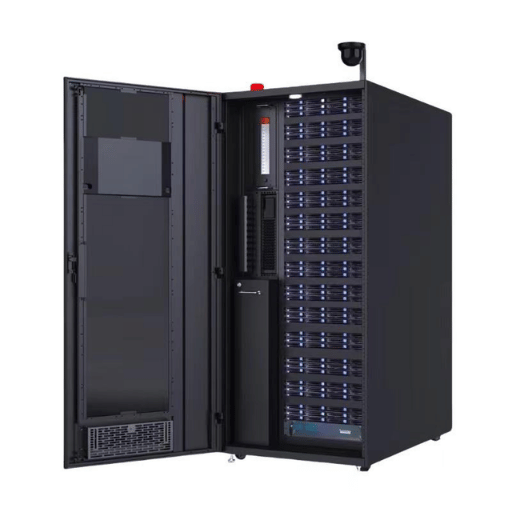
Acoustic-rated enclosed cabinets reduce equipment noise by 15-25 dB(A) compared to a standard perforated cabinet, depending on foam thickness, door seal quality, and intake/exhaust geometry. That puts a noisy 1U server farm closer to background office noise — but only if you accept the cooling trade-off. Acoustic foam blocks airflow as effectively as it blocks sound. Above roughly 500 W of sustained heat load, a soundproof cabinet needs active cooling (in-rack air conditioner or external chilled-air feed) to stay within ASHRAE A2 inlet limits.
Adding acoustic foam to a standard cabinet without integrating a sealed door and cooling unit produces a cabinet that is quieter for two weeks and overheating in the third. Acoustic cabinets are an integrated design — foam, gasketed doors, dedicated cooling — not a retrofit kit.
IP Rating, Outdoor Use, and Industrial Environments
IEC 60529 expresses environmental sealing as a two-digit IP code: the first digit (0-6) rates protection against solid particles and the second digit (0-9) rates protection against water ingress. An indoor data-hall cabinet typically carries no specific IP rating — IP20 is the implicit minimum (protected against fingers, no water protection). Move the cabinet to a warehouse, an oil platform, or a roadside telecom enclosure, and the rating becomes a procurement specification.
| IP code | Solids | Water | Environment |
|---|---|---|---|
| IP20 | Fingers | None | Controlled indoor data hall |
| IP54 | Limited dust | Splash from any direction | Workshop, IDF closet near washdown |
| IP55 | Limited dust | Low-pressure jets | Outdoor sheltered, warehouse |
| IP65 | Dust-tight | Low-pressure jets | Outdoor pole-mount, oil/gas, marine-adjacent |
For US specifiers used to NEMA codes, the rough cross-reference is useful but only approximate: NEMA 4 ≈ IP55 (water/ice resistant outdoor) and NEMA 4X adds corrosion resistance over the same protection class. We maintain a full NEMA vs IP rating comparison chart for cross-standard procurement. If you are sourcing in a market where both standards are used, write both codes into the spec.
IP rating selector by environment
- For a controlled indoor data hall: IP20 is sufficient. KDST’s IP20 indoor server rack cabinet is the working specification for this segment.
- In an office IDF closet or branch retail setting: IP20 with a dust-mitigation perforation pattern.
- For warehouse or light-industrial deployments: IP54 minimum; specify gasketed cable entries.
- When outdoor sheltered (under eave or pole-mount with cover): IP55 with sun shield and thermal management.
- Under industrial vibration, oil/gas exposure, or full outdoor exposure: IP65 sealed, with active cooling and a stainless or aluminum body for corrosion resistance.
One reason this section matters more than buyer’s-guide convention suggests: solar gain on a sealed outdoor cabinet can add 15-25°C above ambient on a sunny day, which collapses your ASHRAE A2 thermal margin even in a temperate climate. Sealed outdoor cabinets without active cooling are a thermal failure waiting to happen. As a 12-year custom-enclosure manufacturer with deployments across 157 countries (KDST, since 2013), the working pattern we see is an IP65 outdoor enclosure paired with a thermoelectric or compressor-based cooling unit and an internal temperature controller — not because the IP65 rating demands it, but because the sun does.
Key Brands and Models: APC NetShelter, Tripp Lite, Eaton, and Custom Manufacturers

Most enclosed server rack procurement decisions in North America and Europe land on one of four naming conventions: APC NetShelter (Schneider Electric), Tripp Lite SmartRack (Eaton), Vertiv VR-series, or a regional custom manufacturer. Each occupies a defined tier of the market.
“Open-frame and enclosed cabinet selection should follow the load profile and the room — not the brand. The brand decision usually follows ten minutes after the spec is locked.”
— Synthesized perspective from data center engineering forums
Five brand tiers — buyer-side mental model
- At hyperscale (OCP-aligned): 21″ Open Rack v3 from Cheval Group, Wiwynn, etc. — 21-inch frame, not 19-inch. Adapter rails available for mixing 19-inch gear.
- In enterprise data centers: APC NetShelter SX/SV (Schneider Electric), Vertiv VR. Strong colo-ready feature sets.
- For SMB and mid-market buyers: Eaton Tripp Lite SmartRack, StarTech, RackSolutions. Volume pricing, fast shipping.
- In office and closet environments: Sysracks, Tripp Lite SR-series wall-mount, Black Box. Smaller footprint, simpler thermal design.
- For custom, outdoor, and telecom deployments: KDST and similar OEMs serving custom-spec, IP-rated, harsh-environment requirements. Lead times are longer; spec flexibility is much higher.
When you run a cross-vendor specification check, the questions that separate genuinely equivalent options from same-named-different-spec products are: usable internal depth at the rear rail (not external), perforation percentage on front and rear doors, static and dynamic load ratings (dynamic is always lower), cable entry locations, and whether the rack ships flat-pack or pre-assembled. Brand reputation rarely answers these; product datasheets do.
Application-Specific Setups: Data Center, Office, Edge, Telecom
The same hardware looks different depending on where it lands. Five common deployment contexts and their working specifications:
| Context | U / depth | IP | Cooling | Security | Notes |
|---|---|---|---|---|---|
| Enterprise data center | 42U / 1200 mm | IP20 | Hot/cold aisle + perimeter CRAC | Key + RFID | Hot/cold-aisle containment compatibility |
| Office IDF closet | 12U / 600 mm | IP20 | Top-mount fans | Key | Acoustic foam optional |
| Edge / micro data center | 24U / 1000 mm | IP54 | In-rack AC unit | Combination + remote audit | Self-contained, often unattended |
| Outdoor telecom shelter | 24U-42U / 800-1000 mm | IP55-IP65 | Active outdoor cooling | Tamper-evident hardware | Sun shield, lightning bonding |
| AV broadcast rack | 15U-24U / 600-800 mm | IP20 | Quiet fans (≤30 dB(A)) | Combination | Low-vibration design for sensitive AV equipment |
What’s Changing in 2026: AI Density, Edge Deployments, and Cabinet Trends

Three shifts are visible in current procurement data and authoritative surveys, with one important methodological caveat.
1. Rack power density is climbing for AI workloads — but slowly for everyone else. The Uptime Institute Global Data Center Survey 2024 found that average server rack densities are increasing but remain below 8 kW per rack, with most facilities still not exceeding 30 kW per rack. The 2025 update confirms the trend continues to rise slowly, driven by greater adoption of the 10-30 kW range. AI and HPC workloads are a different story: industry market research reports modern AI/HPC racks drawing 30-100 kW per rack, well above traditional designs. If you are buying now for a 5-year horizon, specify rear-door heat exchanger (RDHx) compatibility even if you don’t need it today.
2. Edge deployments are growing faster than the core market. Edge data center infrastructure was valued at $14.7-$15.2 billion in 2025, growing at a compound annual growth rate of around 17.5% through 2035 according to multiple market research sources. That growth lands disproportionately in IP54-IP65 outdoor and ruggedized cabinets, not indoor IP20 — a shift visible in our internal export pattern as well, where North America and Europe together account for roughly 53% of demand and Middle East / North Africa for another 15%.
3. The 21-inch OCP Open Rack standard is no longer a fringe topic. Open Compute Project’s Open Rack v3 (21-inch frame) is the hyperscale alignment, and adapter rails are commercially available to mix 19-inch EIA equipment into a 21-inch frame — Cheval Group ships an OR v3 21″ → EAI 19″ 1OU adapter today. Enterprise buyers can ignore OCP for now; buyers planning hyperscale-adjacent or co-location procurement should verify whether their hosting provider has migrated.
One methodology caveat: our internal search-volume analysis shows the “enclosed server rack” keyword family rose roughly 78% in Q3-2025 compared with Q2-2025. We treat this as a directional signal, not a confirmed secular trend — quarter-over-quarter analysis cannot rule out a typical Q3 IT-capex purchasing spike. Buyers planning long-horizon procurement should weight authoritative Uptime data more heavily than short-window search trends.
Frequently Asked Questions
Q: What’s the difference between an enclosed server rack and an open frame rack?
View Answer
Q: How much depth does my enclosed server rack need?
View Answer
Q: Will an enclosed cabinet have enough cooling for my servers?
View Answer
Q: Are enclosed server racks safe for office environments?
View Answer
Q: What IP rating do I need for an outdoor enclosed server rack?
View Answer
Q: Can I use an enclosed server rack for AV equipment?
View Answer
About This Buyer’s Guide
This enclosed server rack buyer’s guide draws on KDST’s experience designing telecom enclosures and electrical cabinets since 2013, with deployments across 157 countries and concentrations in North America (28%), Europe (25%), and the Middle East / North Africa (15%). Cooling thresholds and IP rating recommendations cite ASHRAE TC 9.9 and IEC 60529 directly. Sizing dimensions reference EIA-310-D. Brand comparisons reflect publicly available spec sheets and engineering forum reports as of Q4-2025. Pricing references are indicative — please request current quotations for project bids.
References & Sources
- Ingress Protection (IP) ratings — IEC 60529 — International Electrotechnical Commission
- 19-inch rack — EIA-310-D and IEC 60297 specifications — Wikipedia (industry-curated reference)
- 2021 Equipment Thermal Guidelines for Data Processing Environments (Reference Card) — ASHRAE Technical Committee 9.9
- Global Data Center Survey 2024 — Uptime Institute
- Global Data Center Survey 2025 — Uptime Institute
- Open Rack Specifications and Designs — Open Compute Project Foundation
- IP Code Ratings (IEC 60529) — American National Standards Institute
Related Articles
- Understanding 19-inch Rack Standards (EIA-310) — a deeper walkthrough of the dimensional specification referenced throughout this guide
- Cabinet U Space Explained: From 6U to 48U — practical sizing companion piece for the U-height table above
- Telecom Cabinet Cooling Solutions: Complete Guide — heat exchanger vs cabinet AC vs semiconductor TEC selection
- NEMA vs IP Rating: Cross Reference Chart — the deeper standard mapping referenced in the IP rating section
- IP20 indoor server rack cabinet — the indoor data-hall configuration examined in the IP rating section
- Data center cabinet category — a full enclosure range across IP and U-height specifications
- KDST manufacturing and global deployment overview — telecom enclosure and electrical cabinet experience since 2013 in 157+ countries


![What Is a Power Box? Types, Functions & Selection Guide [2026]](https://www.kdstelectrical.com/wp-content/uploads/0-9-300x200.png)
