Quick Specs: Server Rack Cabinets
| Mounting Standard | 19-inch (482.6 mm) per EIA-310-D |
| Rack Unit (1U) | 1.75 inches (44.45 mm) |
| Common Heights | 12U, 22U, 42U, 48U |
| Depth Range | 600 mm – 1,200 mm (23.6″ – 47.2″) |
| Static Load (typical 42U) | 2,000 – 3,000 lbs (907 – 1,361 kg) |
| IP Rating Range | IP20 (indoor basic) to IP66 (outdoor sealed) |
Choosing the wrong server rack cabinet means you will be paying for a lot more than a few greenbacks. You will be paying with low uptime, erratic airflow, and costly modifications during the first year. Whether you are spec’ing a brand new server room, planning a new data center, or erecting a new telecom shelter, the single rack you select will shape the next decade and a half or so of how your gear performs and how easy it is to maintain.
This server rack cabinet buying guide will help you understand every decision point: types of server racks, rack size and weight, cooling, power distribution, and factors to consider when choosing a server rack. Each section will tell you the specific metrics and standards you need to know to buy confidently— not ambiguous “consider your needs” guidance. Whether your need is for a simple open frame rack or for a rack cabinet in a high-density data center, the process below will be equally valid.
What Is a Server Rack Cabinet and Why Does It Matter?
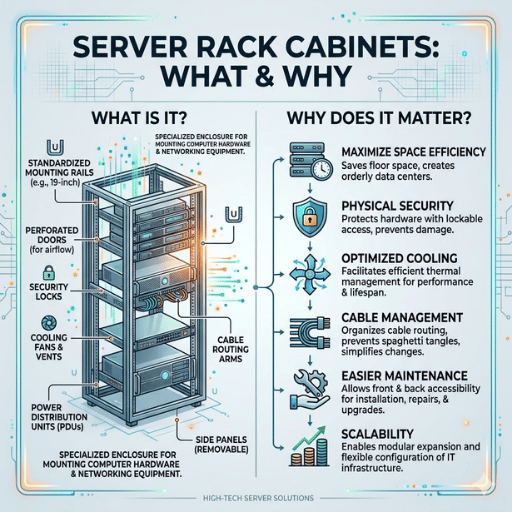
A server rack cabinet is an standardized enclosure that mounts, organizes, and shields rack mount equipment such as servers, network switches, patch panels, and backup power supplies. To keep loads consistent, every rack-mountable piece of equipment follows the definition outlined by the EIA-310-D specification from the Electronic Industries Alliance — its 19 in (480 mm) width and 1.75 in (44.5 mm) step height (U).
This standardization means a 1U server from any manufacturer will fit into any EIA-310-D compliant rack whether it is a two-post wire closet relay rack or a clad 42U enclosure in a Tier III data center. Using a unit system you know e×actly how much vertical height your new purchase will need— a 2U server will take two units’ worth of space or 3.5 in (89 mm), while a 4U chassis packs 7 in (178 mm) of height. All measurements translate directly from vendor to vendor.
📐 Engineering Note
EIA-310-D specifies a hole spacing of 0.625 in (15.9 mm) that is maintained between hole centers for all rack unit positions. Cage nuts, clip nuts, tapped holes, and so on must be compatible with this spacing and alignment. When considering equipment from different manufacturers, check to see that the rail-to-rail depth adjusted offered by each rack will leave you with 50 mm to run cable out either side in the event that you need to mix vendors.
Any good server rack buying guide should tell you that the physical chassis matters for the simple reason that it determines three factors affecting equipment durability: airflow distribution, physical security, and cable organization. A bad choice of rack creates hot spots, rob access, and turn cable management into an isolated and eventually unmanagable problem.
Types of Server Racks: Open Frame vs. Enclosed Cabinet vs. Wall Mount
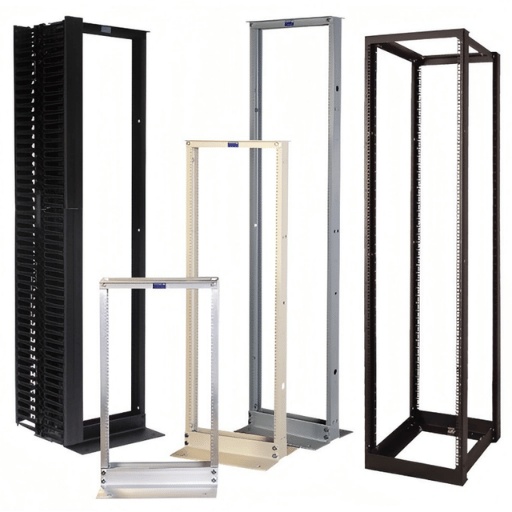
Server racks and cabinets cluster into three types of construction. They each serve a different environment, and failure to comply with the type of rack you select is one of the most costly oversights in data center architecture— because you cannot convert from one type to another without replacing the entire rack.
| Feature | Open Frame Rack | Enclosed Cabinet | Wall-Mount Rack |
|---|---|---|---|
| Post Configuration | 2-post or 4-post | 4-post with side panels | 2-post or 4-post swing frame |
| Typical Height | 42U – 48U | 22U – 48U | 6U – 18U |
| Static Load Capacity | 800 – 2,500 lbs | 2,000 – 3,000 lbs | 60 – 200 lbs |
| Airflow | Unrestricted (open sides) | Directed (perforated doors) | Limited (shallow depth) |
| Physical Security | None (exposed equipment) | Lockable doors + side panels | Basic lock (varies) |
| Dust/IP Protection | None (IP20 equivalent) | IP40 – IP66 (model dependent) | IP20 – IP40 |
| Price Range (USD) | $150 – $500 | $400 – $2,500 | $80 – $400 |
An open frame rack is not merely a device for the smallest of applications. Large operations use 4-post open frame racks specifically – the unencumbered airflow keeps the most modern high-density servers running cooler without recourse to fan-limiting perforated doors. The negative is there is zero dust barrier and zero physical security. If your server room is shielded from the outside world, has filtered and conditioned air, and does not contain sensitive customer data that puts you into compliance, an open frame rack system might still be the best thermal choice.
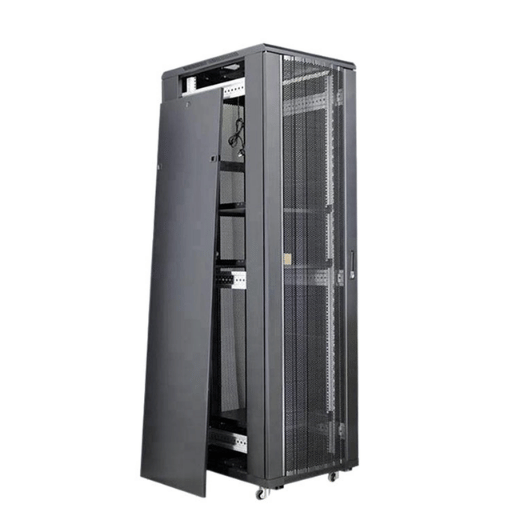
Enclosed cabinets—These are the additions of side panels, lockable front and back doors, and directing airflow through perforated panels. A cabinet designed for this purpose is the preferred option if equipment needs protection from dust, unauthorized physical access, or the environment. Look for cabinets with an IP40 protection rating or greater with a 19-inch rack — this prevents access to anything larger than 1 mm (i.e., wires, tools) but still provides suitable ventilation.
Wall-mount racks—These are suitable for branch offices, retail locations, and wiring closets where a limited amount of equipment is needed and space is limited (usually no more than 15U of network switches, patch panels, and a router). They mount to existing wall studs and open at the back for access to cables.
Practitioners across the industry have found that if using an open frame rack would suffice and a cabinet is purchased there is a $300-$1,500 excess cost per rack and in some cases airflow restrictions are created. Are the facilities within your environment filtering regularly enough and controlling room access effectively to justify a self-enclosed machine? If they are, an open frame rack will generally facilitate better cooling and lower cost.
How to Determine the Right Server Rack Size
Choosing the right server rack means getting three independent dimensions correct: height, depth, and width. Any one that is incorrect will result in rack equipment that cannot be installed or maintained. The 19 inch external width is a standard imposed by EIA-310-D, which leaves the two significant attributes for decision-making as height and depth.
Height: Counting Rack Units
Calculate by totaling the height of all devices intended to be installed and add an additional 20-30 percent to accommodate growth and desired spacing for air flow. Many initial error plans include purchasing the tallest available rack without considering ceiling height; a 42U server rack will reach 73.5 inches (1,867 mm) — one rack unit measures exactly 1.75 inches (44.45 mm) — using the standard 19 inches (482.6 mm) width of rack rails but with casters and a top panel included, is actually around 80-82 inches (2,032-2,083mm). Be sure to check your ceiling height; you will want to allow at least 6 inches (152.4 mm) for hot air exhaust, hung ceilings, and overhead cable management.
| Rack Height | Rail Height | Total w/ Casters | Typical Use |
|---|---|---|---|
| 12U | 21 in (533 mm) | ~27 in (686 mm) | Branch office, small wiring closet |
| 22U | 38.5 in (978 mm) | ~45 in (1,143 mm) | SMB server room, network closet |
| 42U | 73.5 in (1,867 mm) | ~80 in (2,032 mm) | Standard data center, enterprise |
| 48U | 84 in (2,134 mm) | ~90 in (2,286 mm) | High-density data center, colocation |
Depth: The Overlooked Dimension
Adequate rack depth is often neglected in initial planning; first-time buyers commonly underestimate this dimension. The real usable interior depth-measured from the front to the rear of the mounting rails- must be about 2 inches (50 mm) greater than your deepest piece of equipment to enable the preparation of cable inlets and adequate airflow.
Cabinets have an external depth-typically between 23.6 inches (600 mm) for a network-focused rack and 47.2 inches (1,200 mm) for a full-depth server cabinet. For mixed use environments, expect an internal depth of about 39.4 inches (1,000 mm);if you require a cabinet to be installed through a standard door of about 36 inches (914 mm) wide it is best to go with something equivalent to a 1,000 mm (39.4 inches) depth.
📐 Engineering Note
Measure the narrowest doorways prior to purchase. A fully-populated 42U cabinet (with side panels in) will be approximately 600-800 mm wide and 1,000-1,200 mm deep. If a doorway is narrower than the cabinet’s diagonal dimension, you will need to specify a rack that ships flat-packed and is assembled on-site. Check that the floor loading capacity supports the fully-loaded rack weight – a 42U cabinet having 2,500 lbs of equipment on board concentrates the load on four caster points or leveling feet in approximately 4 square feet.
Weight Capacity and Structural Load Ratings
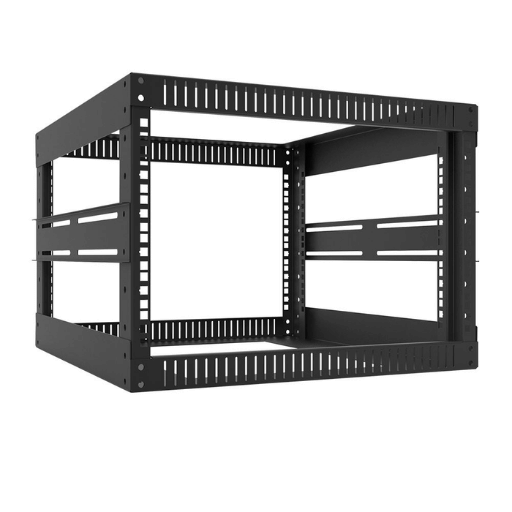
All server racks come with three individual load ratings. It is a safety hazard to mix up these three numbers. These specifications are not interchangeable – each represents a different loading condition.
| Rating Type | Typical Range (42U) | What It Measures |
|---|---|---|
| Static Load | 2,000 – 3,000 lbs | Maximum weight when rack is stationary and bolted to floor |
| Dynamic Load | 1,200 – 2,500 lbs | Maximum weight when rack is rolling on casters during relocation |
| Rolling Load | 800 – 2,000 lbs | Maximum weight during sustained transport over uneven surfaces |
Dynamic load rating is always lower than static load rating. When engineers call a load “safe” they are assuming the racks are static – locked down and immobile. Engineers often load racks near their static capacity then attempt to reposition the equipment. Mobile loads impart torque, vibration and racking forces that exceed the dynamic rating, jeopardizing the structural integrity of the rack, or even bringing it down outright. Always size your rack based on dynamic load if there is any possibility it will be moved within its lifetime.
- ✔
Calculate total equipment weight including all accessories - ✔
Add 25% safety margin above your calculated total - ✔
Determine concrete or structural steel floor load capacity at the installation site (concentrated point loads, not distributed) - ✔
Select leveling feet (not casters alone) to maximize the thermal and structural capacities of the rack - ✔
Arrange heavy equipment (such as server blades) in the lower third of the rack to lower center of gravity
Cooling, Airflow, Cable Management, and Power Distribution

Thermal management accounts for 30-40% of total data center energy costs, and the server rack enclosure is where cooling efficiency either succeeds or fails. Your rack’s airflow design directly determines whether cooling energy is wasted or effectively used for the rack mount servers and networking equipment inside. Data center managers who overlook this end up paying twice — once for the power and once for the wasted cooling.
Hot Aisle / Cold Aisle Configuration
The most economically effective rack-level cooling system is the hot aisle/cold aisle configuration, as proposed by IBM in 1992. Equipment is installed in the racks so that airflow to inlets is directed into the cold aisle and air exhausting from the equipment is drawn into the hot aisle. According to ENERGY STAR’s data center efficiency guidelines, this method produced cooling savings of between 10 and 35% with reference to random rack layout. With variable flow fans and containment, the additional 20-25% savings gained from cooling fan energy use is offset by the improved energy efficiency of chillers.
Perforated Doors and Blanking Panels
Enclosed cabinets should use perforated rack doors on both the front and rear to allow directed airflow. Higher rack densities require higher perforation percentages – standard-density deployments typically use doors with 64-70% open area, while high-density racks may need 77% or more perforation to prevent thermal throttling. Every unused U position should be covered with blanking panels to prevent hot exhaust air from recirculating through empty gaps back to the cold aisle.
Cable Management
Airflow-blocking cable bundles are most responsible for localized hot spots within server cabinets. Vertical cable managers assembled on both sides of the network rack contain power and data cables and hold them apart. Horizontal cable managers at 1 U – 2 U intervals keep those bundles from drooping across the back of mounted equipment. For every U that is not occupied, install a blanking panel to create a direct front-to-back airflow path behind each device.
Power Distribution Units (PDUs)
PDUs are installed vertically in the rear of the rack cabinet providing power to the equipment installed. There are three types providing monitoring of different functionality:
| PDU Type | Monitoring | Typical Rating | Use Case |
|---|---|---|---|
| Basic | None | 15A – 30A / 120V–208V | Small deployments, cost-sensitive |
| Metered | Total load (amps/kW) | 20A – 60A / 120V–208V | Capacity planning, billing |
| Switched | Per-outlet on/off + monitoring | 20A – 60A / 120V–208V | Remote management, colocation |
Install a 2nd set of PDUs for each rack (A+B power feeds) to ensure redundancy. Each set of PDUs must support the entire load independently so that a single feed loss will not cause the entire rack to power off. This dual feed setup is typical in uptime critical environments.
For rack accessories, order blanking panels, vertical cable managers, and PDU mounting brackets along with your rack. Retrofitting these cable management features is 3-5 longer to do and can severely impact airflow paths. Budget ~15-25% of your rack cabinet cost for necessary accessories.
Server Rack Cabinet Cost Factors and Where to Buy

Pricing for rack cabinets varies dramatically based on type, size, load rate capacity and options. Knowing the dimensions of what drives cost will tell you how to avoid overspending on unnecessary options and underspending on structural quality that will fail 2 years later.
| Rack Type | Price Range (USD) | Key Cost Drivers |
|---|---|---|
| Open Frame (2-post) | $150 – $350 | Height, steel gauge, caster quality |
| Open Frame (4-post) | $250 – $500 | Load capacity, adjustable depth rails |
| Enclosed Cabinet (42U) | $400 – $2,500 | Steel thickness, IP rating, door type, lock system |
| Wall-Mount Rack | $80 – $400 | Depth, swing mechanism, U height |
| Outdoor / IP66 Enclosure | $1,500 – $5,000+ | Weatherproofing, integrated cooling, NEMA rating |
The largest cost difference is not the rack, but the accessories: PDU’s ($100-$800 each), cable management ($50-$200), blanking panels ($15-$50 each), mounting hardware ($30-$100). A $500 enclosed cabinet with $600 of accessories it far more usable than a $1,100 cabinet with no cable management.
Inexpensive cabinets have lower prices by using thinner steel (18-gauge vs. 16-gauge), more generic door hinges, and less included accessories. These savings become cost if the rack cannot support load safely, doors bind repeatedly when opened, or you buy all accessories separately. For 6 or more racks for your data center, ask for quotes directly from the manufacturers — volume discount will often cut the price by 15-30%. Selecting the correct server cabinet size upfront avoids costly rack space shortages that force premature purchases later.
FAQ — Server Rack Cabinet Questions Answered
Q: How do I choose the right server cabinet?
View Answer
Begin by listing each of the pieces of equipment you will be installing (alludes to all devices’ U height, depth, weight, and power consumption). Build in 20-30% headroom for future growth. Then compare your equipment requirements to the three types of rack (open frame, enclosed cabinet, wall mount) that will work with your security, dust, and cooling considerations.
Remember to check that the cabinet’s depth is at least your deepest equipment plus 50 mm for rear cable management.
Q: What does 1U, 2U, 3U, 4U mean?
View Answer
Q: What size server cabinet do I need?
View Answer
Q: Should I get a 2-post rack, 4-post rack, or rack enclosure?
View Answer
2-post racks are fine for lightweight, network equipment—switches, patch panels and cable management that fasten only at front ears. Use 4-post for heavier servers for front and rear rail support. Full rack enclosure (4-post with side panels and doors) provides some physical security and reduces dust.
Selection should come down to the weight of your equipment and your security needs: 2-posts can work for pure network deployments, whereas servers require 4-post or better.
Q: What are the most important rack accessories for server racks?
View Answer
Q: How much U space do I need in a server rack?
View Answer
Calculate total U space used by all the equipment you intend to install: regular 1U servers occupy 1U each, 2U storage servers two..etc, connection accessories occupy large U space. If you multiply that total by 1.3 (growth buffer by 30%) it should give you some idea: e.g. if your equipment occupying 28U, then you should go for at least 36U tall cabinet. But the common planning is quite different.
Usually data center planners go for 42U cabinet because the cost per unit of 42U is quite the same as 36U, and it gives the headroom for future..
About This Guide
KDST designs and manufactures custom protective enclosures for data center and telecom infrastructure. This buying guide reflects our engineering team’s experience with server rack cabinet specifications, IP-rated enclosure design, and thermal management across deployments in multiple climate zones. Technical specifications reference EIA-310-D, ENERGY STAR, and ASHRAE standards. Where industry-typical ranges are cited without a specific source, values were cross-referenced against multiple manufacturer datasheets.
References & Sources
- Rack and Row Guidelines — University of Arkansas IT Services
- Move to a Hot Aisle/Cold Aisle Layout — ENERGY STAR (U.S. EPA)
- KSC-SPEC-E-0002 Revision A — Electrical Equipment Installation — NASA Kennedy Space Center
- Data Center Resources & Thermal Guidelines — ASHRAE
- IP vs. NEMA: Which Rating Does Your Enclosure Need? — Rittal